A custom AI employee brief defines the job, the sources and tools it needs, and what a useful result looks like. Start with one responsibility, add a finished example, and test the brief again after making a correction. The result should be a role your team can maintain as its work changes.
Artie is our product. His employee catalog offers a custom employee option with a role, tools and responsibilities you choose. This guide helps you prepare that role brief. It is not a walkthrough of the current creation interface.
If you are still choosing what to hand over, start with our guide to delegating ongoing work to an AI employee. Here, we will turn a weekly customer-risk brief into a specific role description, then show how to revise it after the first result.
Choose the responsibility before the title
A useful role has an owner, an audience and a finished output. “Operations assistant” tells you little about any of those. “Prepare the weekly customer-risk brief for the head of customer success” establishes who receives the work and why it exists.
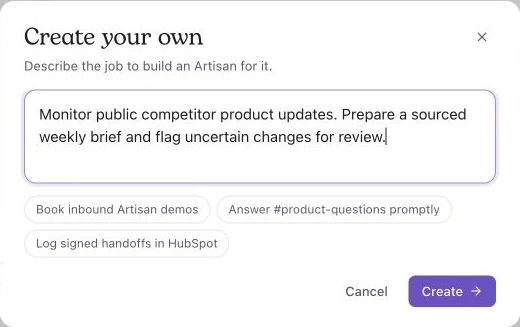
A job description entered in the custom-employee form in October 2026, before creation.
Ask the person who currently performs the job to describe the last completed example. Which inputs did they use? Which decisions required judgment? What did the reviewer change? Those details reveal the assignment more reliably than a long list of possible duties.
Keep the first remit narrow enough to inspect. For the customer-risk role, preparing a weekly draft is a clear starting point. Managing every customer relationship would require a much broader assignment.
Write a role brief with a finished example
The following is a fictional assignment you can adapt. Replace the source descriptions and destination with links to your team's actual records before using it.
Role: Customer-risk analyst for the customer-success team.
Responsibility: Prepare a Friday account-risk draft showing newly missed milestones, unresolved customer questions and material changes since the previous brief.
Sources: Use the approved project tracker for milestone dates, the account record for ownership and the account notes for customer questions. Use the previous accepted brief as the format reference.
Output: Save one draft in the team's review folder. For each affected account, include the owner, the change, its source link, the open question and a proposed next step. Keep recommendations separate from agreed commitments.
Cadence: Prepare the draft by 10 a.m. each Friday in the team's agreed time zone. Compare it with the previous accepted brief and explain new or resolved issues.
Routine actions: Read the named records and create or revise the draft. Do not send customer messages or change customer commitments.
Review owner: The customer-success lead reviews the draft and resolves conflicting records. Name a backup for absences.
Exceptions: If a source is inaccessible, list the affected accounts and the missing source. Do not present those accounts as fully reviewed. If an owner or decision is missing, identify the gap and the person who can resolve it.
Attach one example of an acceptable entry. For the fictional account Cedar, it could read:
Cedar: The onboarding milestone moved from Wednesday to Friday in the project tracker. Account owner: Maya. The account notes still show Wednesday, and neither record confirms that the customer agreed to Friday. Proposed next step: Maya checks the agreed date before the team updates the customer. Sources: the milestone record and account note.
In your real example, replace those source descriptions with links. The entry should make the disagreement easy to inspect. It should not turn an internal date change into a claim that the customer accepted it.
Give the employee a small, maintained source set
Start with the current process description, a relevant glossary, a good previous output and the live records needed for the job. Explain which source owns each fact.
In this example, the project tracker establishes the team's current plan. It does not necessarily establish what the customer agreed to. A confirmed customer message may answer that different question. If the records conflict, the brief should preserve the distinction and name the person who can resolve it.
Mark superseded guidance clearly. A folder full of old briefs can otherwise give the employee several plausible versions of the same rule.
Artie's homepage describes a shared company knowledge library used within granted access. Choose the context that belongs with the role. Do not assume that every private conversation or preference should be available to every teammate.
Connect the actions the role needs
List the required actions in ordinary language: read a project record, open an approved document and save a draft. Verify those actions in the accounts the role will use.
Reading a CRM record, changing a field and writing an activity note are different operations. An integration name alone does not tell you which ones are available. Artie describes a work computer and connections through native integrations, APIs and MCP. Check the route that supports your specific assignment.
For the first cycle, use a small set of representative records and a draft destination. Open the saved output and check its contents. This reveals whether the role can deliver the brief where the team needs it, as well as write it.
Separate instructions from enforced permissions
The customer-risk brief allows research and drafting. The customer-success lead decides what to communicate externally. Put that boundary in the role description, then check the permissions on the connected tools.
Artie's security guidance explains that approval decisions involve AI judgment and can be wrong. An instruction to ask before sending is different from an account permission that prevents sending. Where an action must be restricted, use the available tool controls as well as clear instructions.
Revise the brief after the first result
Suppose the first draft finds the changed milestone but omits the account owner. Correct the output and update the role brief: every unresolved question must include the responsible account owner, or explicitly say that the owner is missing.
Then test the revised brief with changed inputs. Include one account without an owner and one record the employee cannot access. Review whether the next draft:
Preserves the corrected format.
Identifies the missing owner instead of inventing one.
Names the inaccessible record and the gap it leaves.
Separates newly discovered issues from issues already in the previous brief.
Saves the result in the expected destination.
These are acceptance criteria for your test, not a claim that this fictional workflow has been run. Save both outputs and the revised brief so the next reviewer can see what changed.
Keep the role description current
Give the brief a version and an owner. Record substantive changes, such as a new reporting deadline, source, audience or permission. A change from preparing a draft to sending a customer update changes the role's authority and deserves an explicit decision.
After several cycles, review the time your team spends correcting the result and the decisions the brief helps it make. Expand the role when the output is useful and the remaining work is clear.
Bring one responsibility, one finished example and a named reviewer to your custom role setup. Explore Artie to see the employees and connections available for that work.