Artie is an AI employee platform for teams that want specialist or custom employees to own ongoing work across company tools. Grok Bot is a close alternative with persistent Bots, shared Team Bots and routines, particularly if your organization already has eligible Cursor or Grok access. Compare how colleagues direct the work, the accounts it uses and the total cost of running the responsibility.
Artie is our product. This comparison uses current public documentation, not a head-to-head performance test.
Start with the responsibility and the people involved
Artie describes employees with a work computer and connected tools, supported by company knowledge within granted access. Its employee catalog offers specialist roles and custom creation. That makes Artie a relevant starting point when a marketing, operations or customer-success responsibility belongs to the company and several colleagues need to contribute.
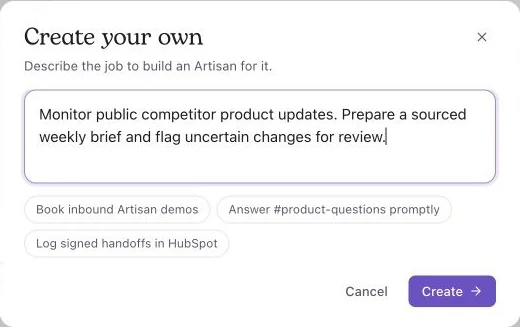
Drafting a competitor-monitoring employee in Artie, before selecting Create. Source: Artie.
Artie's published channels include Slack, WhatsApp, email and text, plus phone calls and Google Meet. Grok Bot also documents dictation and voice chat. Compare the specific communication route your work needs rather than treating voice as an Artie-only feature.
Grok Bot's overview describes persistent, named Bots that can work in parallel, message one another and hand off tasks. Bots belonging to one account share its cloud computer, files, browser sessions and logins. Having several named agents does not, by itself, distinguish the products. The account and permission boundaries matter when dividing work between them.
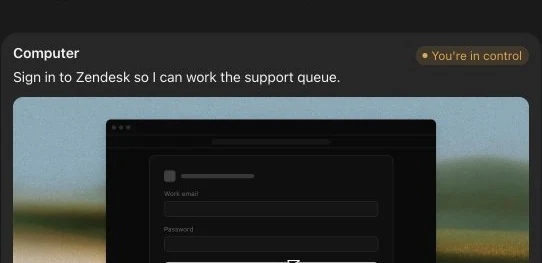
Grok Bot’s public example asks the user to sign in to Zendesk before working on the support queue. Source: Grok Bot.
For example, a marketing lead might own a weekly competitor brief, while sales supplies questions and a product manager reviews technical claims. Write down who may change the assignment, who accepts the draft and who takes over during an absence. A product should support that arrangement without informal credential sharing.
Understand the Team Bot account boundary
Grok Bot's team documentation makes a useful distinction. In a member's private chat, a Team Bot usually works with that member's computer, connected accounts and usage. In Slack channels, threads and group chats, it uses its own computer. Files, plugins and secrets added by the owner are available in teammates' chats.
That means a successful private-chat task does not automatically establish that the shared-channel version has the same access. Identify the destination account and sources in both places before moving a responsibility into a channel.
For Artie, security guidance distinguishes personal and shared connections, workspace roles and the authority to perform an action. Include the same account-and-audience check in an Artie evaluation. Shared company knowledge should not be interpreted as unrestricted sharing of personal messages or accounts.
Compare the subscription you would actually buy
Artie's published Team plan is $100 per month for 10,000 workspace credits, without seat or AI-employee fees. Connected applications may charge separately. Artie's public entry point currently uses a waitlist.
Grok Bot's pricing page displays Cursor Pro at $20 per month, SuperGrok at $30 per month and Cursor Standard Teams at $40 per seat per month, billed monthly. These are different access routes, not three charges every user must pay. Enterprise pricing is arranged with sales.
The canonical billing guide also covers eligible self-serve Grok Business seats. Included usage follows the applicable grant and does not stack across linked subscriptions. Additional usage can continue through enabled on-demand billing. Its monthly limit does not interrupt a run already in progress, which may finish above the limit.
Consider five people who would need new Cursor Standard Teams seats. At the displayed monthly rate, their subscription subtotal is $200 before extra usage. Artie's entry Team subscription is $100 for the workspace. That is a subscription calculation, not evidence of equal work capacity or a 50% saving. If those people already pay for eligible seats, their incremental subscription cost may be zero while included usage remains available.
Do not compare vendor credits, weekly grants or tokens as equivalent units. Record the actual cost of completing the same job, including review and repair time.
Set the approval behavior for the shared setting
Grok Bot's team documentation identifies Enterprise-only controls, including enforced Auto-review and team Auto-review rules. It says Auto-review is skipped in Team Bot conversations with no person available to approve, including teammate chats and Slack, unless the Enterprise enforcement control applies. Evaluate the selected plan and conversation type together rather than assuming a personal approval setting governs every shared interaction.
Artie's security guidance says approval decisions include AI judgment and can be wrong. Where sending or changing a record must be prevented, restrict the connected account or tool accordingly. A sentence in the brief is not a technical permission boundary in either evaluation.
For the first comparison, give both products public sources and a review document. Keep publishing, outreach and production changes outside the assignment. You can compare useful research and handoffs before adding consequential writes.
Use one handoff to decide between them
Use this fictional competitor-research assignment: prepare a draft for the marketing lead, accept a question from sales and let product review the technical claim. A backup marketing owner must be able to find and continue the brief. Do not publish or contact anyone. This exercise has not been run against either product.
Supply an October 1 pricing capture for fictional Northstar at $80 per month without scheduled exports, then an October 8 capture at the same price with exports listed. A current guide confirms exports for Team and Enterprise but says nothing about rollout to existing accounts. A third source, the release notes, fails to load.
Sales asks whether your company can still claim exclusive support for scheduled exports. The expected draft flags that claim for review, identifies Team buyers as affected, requests rollout clarification and records two successful source checks plus one unavailable source. Have the reviewer request a customer segment beside every recommendation, then check whether the next revision retains that field.
Accept the result only if the source change is correctly described, the new field survives and the unavailable source is reported as incomplete coverage. Have the backup owner find the draft and continue the same responsibility. Record which account performed any save and how much human review was needed.
This is a better deciding factor than whether the product calls its agent an employee or a Bot. A team needs the assignment to survive the handoff.
Which should you choose?
Start with Artie when you want specialist or custom employees around ongoing company work, using its documented communication channels and shared workspace budget. Start with Grok Bot when existing paid access, its Team Bot structure or documented Cursor governance fits your organization. Neither choice establishes superior research quality without testing your sources and destination.
Explore Artie's employees and bring one recurring responsibility to the waitlist. Compare the first accepted output and the next person's handoff before expanding the role.
Product information and displayed USD prices reviewed October 10, 2026. Included usage is not directly comparable across vendors.